Every week another founder launches a SaaS product. Most fail — not because the idea was bad, but because the technical foundation was wrong from the start.
Multi-tenancy breaks at scale. Billing logic has edge cases nobody planned for. The authentication system lacks two-factor support. The database was never designed for the queries the application actually runs.
This guide is the technical foundation you need to build a SaaS application with Laravel that actually works in production — not just in development.
Why Laravel Dominates SaaS Development in 2026
Laravel is not just popular — it is specifically designed for the problems SaaS applications face.
Real SaaS products built on Laravel:
- Forge — Laravel's own server management platform
- Envoyer — Zero-downtime deployment tool
- Flare — Error tracking for PHP
- Mailcoach — Email marketing platform
- Invoice Ninja — Invoicing SaaS with millions of users
These are production SaaS products handling millions of requests. The framework clearly scales.
Why Laravel specifically:
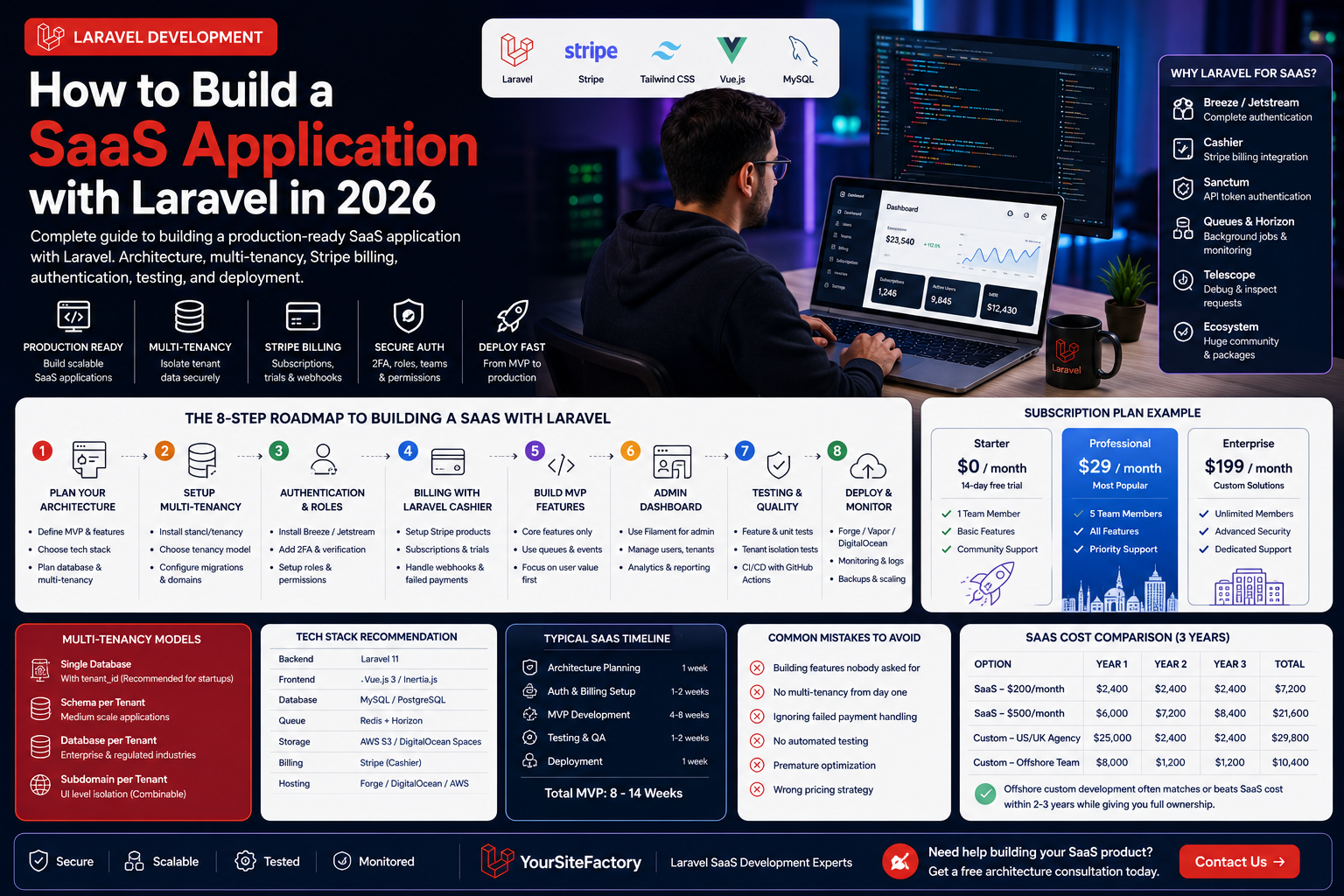
- Authentication: Breeze and Jetstream provide complete auth — login, registration, 2FA, email verification, password reset — in minutes
- Queues: Background job processing for emails, reports, and file processing without blocking HTTP requests
- Cashier: Stripe and Paddle billing integration built and maintained by the Laravel team
- Sanctum: API token authentication for headless frontends and mobile apps
- Telescope: Development debugging and request inspection
- Horizon: Queue monitoring dashboard
Step 1 — Define Your SaaS Architecture Before Writing Code
The most expensive mistake in SaaS development is starting to build before the architecture is clear. Answer these questions first:
Product questions:
- What specific problem does your SaaS solve?
- Who is your primary user persona?
- What is the absolute minimum feature set for launch (MVP)?
- What does success look like after 6 months?
Technical questions:
- Multi-tenancy model — shared database or separate databases?
- Authentication requirements — social login, SSO, 2FA?
- Billing model — subscription, usage-based, or hybrid?
- API — headless with React/Vue frontend, or traditional Blade templates?
- Expected scale — 100 users or 100,000 users at launch?
Getting these answers takes one day. Changing them midway through development takes weeks.
Step 2 — Choose Your Multi-Tenancy Approach
Multi-tenancy determines how your SaaS isolates data between customers. This decision affects your entire database architecture and cannot be changed easily later.
| Approach | Best For | Complexity | Data Isolation |
|---|---|---|---|
Single database with tenant_id | Startups, MVPs | Low | Medium |
| Schema per tenant | Medium-scale products | Medium | High |
| Database per tenant | Enterprise, regulated industries | High | Complete |
| Subdomain per tenant | Any (combinable) | Medium | UI level |
Recommendation for most startups: Single database with the stancl/tenancy package. Install it early — retrofitting multi-tenancy later is painful.
composer require stancl/tenancy
php artisan tenancy:install
Step 3 — Authentication and User Roles
Install Laravel Breeze for the cleanest authentication scaffold:
composer require laravel/breeze
php artisan breeze:install
php artisan migrate
Then add role management with Spatie's permission package:
composer require spatie/laravel-permission
php artisan vendor:publish --provider="Spatie\Permission\PermissionServiceProvider"
php artisan migrate
Standard SaaS role structure:
| Role | Permissions |
|---|---|
| Super Admin | Full platform access, manage all tenants |
| Account Owner | Manage subscription, invite team members |
| Admin | All features within their tenant |
| Member | Standard product features |
| Read Only | View only access |
Step 4 — Subscription Billing with Laravel Cashier
Laravel Cashier is the official Stripe integration for Laravel. Install it:
composer require laravel/cashier
php artisan vendor:publish --tag="cashier-migrations"
php artisan migrate
Add the Billable trait to your User or Team model:
use Laravel\Cashier\Billable;

class Team extends Model {
    use Billable;
}
Essential billing features to implement:
// Free trial
$team->newSubscription('default', 'price_professional')
    ->trialDays(14)
    ->create($paymentMethod);

// Check subscription status in middleware
if (!$team->subscribed('default') && !$team->onTrial()) {
    return redirect('/billing');
}

// Handle failed payments via webhooks
// In routes/web.php
Route::post('/stripe/webhook', '\Laravel\Cashier\Http\Controllers\WebhookController@handleWebhook');
Recommended subscription plan structure:
| Plan | Price | Features |
|---|---|---|
| Free Trial | $0 / 14 days | Full access |
| Basic | $29/month | Core features, 1 user |
| Professional | $79/month | All features, 5 users |
| Enterprise | $199/month | Unlimited users, priority support |
Step 5 — Build Your MVP Features
With auth and billing working, build only what delivers core value. The biggest SaaS failures come from over-building before validating.
Laravel features to use strategically:
// Queue everything slow
SendWelcomeEmailJob::dispatch($user)->delay(now()->addSeconds(5));

// Use events for decoupled logic
event(new UserSubscribed($user, $plan));

// Use notifications for multi-channel delivery
$user->notify(new TrialEndingNotification());

// Use policies for clean authorization
$this->authorize('update', $project);
The MVP rule: If a feature does not directly help users achieve the core value of your product, it does not belong in v1.
Step 6 — Admin Panel
Every SaaS needs an admin panel. Options in 2026:
| Option | Cost | Setup Time | Customisation |
|---|---|---|---|
| Filament | Free | 2–4 hours | Excellent |
| Laravel Nova | $299 | 1–2 hours | Good |
| Custom built | Development time | Weeks | Complete |
Filament is the clear choice for most projects in 2026 — it is free, actively maintained, and produces beautiful admin panels quickly.
composer require filament/filament
php artisan filament:install --panels
Step 7 — Testing Strategy
A SaaS that breaks in production loses paying customers — and their trust is nearly impossible to recover.
Minimum testing requirement:
// Test subscription creation
public function test_user_can_subscribe_to_basic_plan() {
    $user = User::factory()->create();
    $this->actingAs($user)
         ->post('/billing/subscribe', ['plan' => 'basic'])
         ->assertRedirect('/dashboard');
    $this->assertTrue($user->fresh()->subscribed('default'));
}

// Test tenant data isolation
public function test_tenant_cannot_access_other_tenant_data() {
    $tenant1 = Tenant::factory()->create();
    $tenant2 = Tenant::factory()->create();
    $this->actingAs($tenant1->owner)
         ->get("/projects/{$tenant2->projects->first()->id}")
         ->assertForbidden();
}
Run tests automatically on every commit with GitHub Actions:
- name: Run Tests
  run: php artisan test --parallel
Step 8 — Deployment and Monitoring
Hosting options for Laravel SaaS in 2026:
| Platform | Monthly Cost | Best For |
|---|---|---|
| Laravel Forge + DigitalOcean | $12–$50 | Most startups |
| Laravel Vapor (AWS) | $50–$500+ | High scale, serverless |
| Heroku | $25–$250 | Simple setup, higher cost |
| Railway | $5–$50 | Developer-friendly |
Monitoring stack:
- Laravel Telescope — Development debugging
- Laravel Horizon — Queue monitoring
- Sentry — Production error tracking (free tier available)
- UptimeRobot — Uptime monitoring with alerts
- Papertrail — Log management
SaaS Launch Timeline
| Phase | Duration | What Happens |
|---|---|---|
| Architecture planning | 1 week | Database design, tech decisions |
| Auth + billing setup | 1–2 weeks | Login, subscription, admin |
| MVP features | 4–8 weeks | Core product value |
| Testing + QA | 1–2 weeks | Bug fixes, edge cases |
| Deployment setup | 1 week | Server, monitoring, backups |
| Total MVP | 8–14 weeks | Ready for first paying customers |
Common Mistakes That Kill SaaS Projects
- Building features nobody asked for — talk to 10 potential customers before writing code
- No multi-tenancy from day one — retrofitting it later costs 3× as much
- Skipping failed payment handling — involuntary churn kills SaaS businesses
- No automated testing — every deployment becomes a risk
- Premature optimisation — do not optimise for 100,000 users when you have 10
- Wrong pricing — most SaaS founders underprice by 50–70%
FAQ — Building SaaS with Laravel
How long does it take to build a SaaS with Laravel?
A focused MVP with authentication, billing, core features, and admin panel takes 8–14 weeks with an experienced team. Simple tools can launch in 4–6 weeks. Complex platforms take 16–24 weeks.
Is Laravel good for large-scale SaaS?
Yes. Laravel SaaS products handle millions of users in production. Proper use of caching, queues, database optimisation, and horizontal scaling handles any load.
How much does it cost to build a SaaS with Laravel?
A basic SaaS MVP costs $5,000–$15,000 with an offshore team. US or UK-based development costs $30,000–$100,000+. YourSiteFactory builds Laravel SaaS MVPs starting from $5,000.
Should I use Laravel Jetstream or Breeze?
Breeze for simple authentication. Jetstream if you need teams, profile photos, API tokens, and two-factor authentication out of the box. Most SaaS applications benefit from Jetstream.
What is the best admin panel for a Laravel SaaS?
Filament in 2026. It is free, beautiful, and faster to build with than Laravel Nova for most use cases.
Do I need multi-tenancy for my SaaS?
If multiple companies will use your product and their data must be isolated — yes. Implement it from day one using the stancl/tenancy package.
What Makes Laravel the Ideal Framework for a SaaS Application?
The number of teams searching for guidance on building a laravel saas application has tripled between 2024 and 2026, and the reason is straightforward: Laravel ships with exactly the primitives that SaaS products need, without forcing you to wire them together from scratch.
Consider authentication alone. A typical in-house auth system covering registration, email verification, password reset, two-factor authentication, and remember-me tokens takes an experienced developer two to three weeks to build and test correctly. Laravel Breeze or Jetstream delivers all of that in under an hour. That saving goes straight into your product features.
Beyond authentication, three Laravel capabilities define it as the right foundation for any laravel saas application:
- Queue system for background jobs. Billing retry logic, welcome email sequences, PDF report generation, and third-party API calls should never block an HTTP request. Laravel Queues with Horizon monitoring make background job management production-ready out of the box.
- Eloquent ORM with global scopes for tenant isolation. Adding a
TenantScopeglobal scope to your base model means every query automatically filters by the current tenant — one line of code preventing an entire category of data-leak bugs. - A complete billing ecosystem. Laravel Cashier handles Stripe subscriptions, trial periods, invoice generation, and webhook verification. Sanctum handles API token authentication for headless frontends. These are packages maintained by the same team that builds the framework — they do not fall behind on major releases.
For founders evaluating frameworks: the SaaS-specific package depth in the Laravel ecosystem means your team spends 40–60% less time on infrastructure code compared to building the same product in a framework without these batteries included. That is not a marketing claim — it is the measurable difference between shipping in 10 weeks versus 16.
How to Build a SaaS with Laravel: The Architecture Decisions That Matter
When you build a SaaS with Laravel, the choices you make in the first two weeks determine whether the product scales cleanly or requires a painful rewrite at 500 customers. The most consequential of these is not which framework version to use or whether to pick Livewire or Inertia — it is your billing plan architecture and your tenant resolution strategy.
Tenant Resolution: Domain vs Path vs Header
The stancl/tenancy package supports three resolution strategies. Most products built saas with laravel use domain-based resolution — each customer gets a subdomain (acme.yourapp.com). This is the cleanest user experience but requires wildcard DNS setup. Path-based resolution (yourapp.com/acme/dashboard) is simpler to deploy. Header-based resolution suits pure API products where the tenant is identified by an X-Tenant-ID header.
Choose your resolution strategy before writing a single route. Changing it later means rewriting middleware, updating all internal links, and migrating customer bookmarks.
Plan Structure: Flat vs Feature-Flag Based
Flat plans (Basic / Pro / Enterprise with fixed feature sets) are easier to build but harder to monetise over time. A feature-flag based architecture stores which capabilities each plan unlocks in the database, letting you create new plans, grandfather old customers, and A/B test pricing without deploying code:
// Feature flag check — plan-agnostic
if ($team->hasFeature('advanced_reporting')) {
    return view('reports.advanced');
}
Implement this from day one. Retrofitting feature flags into a flat-plan codebase means touching every feature gate in the application.
Plan Migrations: Upgrade and Downgrade Behaviour
Laravel Cashier handles the Stripe side of plan changes cleanly with $team->subscription()->swap('price_enterprise'), but it does not handle the application side: what happens to data that only exists on the higher plan when a customer downgrades? Define and test downgrade behaviour explicitly before launch. It is the billing edge case most teams discover only when a real customer triggers it.
Why Agencies Choose Laravel for SaaS Development Projects
When a product agency is scoping a laravel for saas engagement, framework choice comes down to three practical concerns: long-term maintainability, developer availability, and delivery speed. Laravel wins on all three.
Long-term support and predictable upgrades. Laravel releases a new major version annually with an 18-month bug-fix window and a 2-year security-fix window. For a SaaS product running in production for five to ten years, this predictability matters considerably. Teams specialising in laravel saas development can give clients a concrete upgrade roadmap rather than hoping a niche framework stays maintained by its original author.
Developer availability. Laravel is the most widely used PHP framework globally by a significant margin. When a project grows beyond its founding team, hiring is straightforward — the pool of experienced Laravel developers is orders of magnitude larger than the pool for Symfony, Yii, or CodeIgniter. For a SaaS business that will need to hire over time, that translates to lower recruitment costs and faster onboarding.
Speed to MVP through package depth. A realistic estimate for the infrastructure code a SaaS requires before the first product feature is built: authentication, billing, role management, email notifications, admin panel, API layer, queue setup, and deployment pipeline. In Laravel, these are packages installed in hours, not built in weeks. Teams regularly deliver working MVPs 30–40% faster than equivalent projects in frameworks where these capabilities must be assembled from lower-level primitives.
To illustrate: a B2B SaaS for construction project management — authentication, multi-tenant billing, role-based dashboards, and a document module — delivered in 11 weeks. The same scope in a bespoke framework stack had been estimated at 20 weeks by a previous agency. The difference was almost entirely the Laravel ecosystem removing infrastructure build time from the schedule.
Common Technical Mistakes When Building SaaS in Laravel (And How to Avoid Them)
Beyond the product-level pitfalls covered earlier, there is a separate category of saas in laravel implementation mistakes that are invisible during development and low-traffic beta, then surface simultaneously when the first real customer load arrives. Building a stable saas laravel product means anticipating these from the first commit.
-
Mistake 1: Coupling tenant configuration to application code.
Hardcoding tenant-specific values — feature limits, plan names, third-party API keys — directly into config files makes every new tenant a deployment event. Store tenant configuration in the database, loaded via the
stancl/tenancytenant model. The application code should be completely unaware of which specific tenant it is currently serving. -
Mistake 2: Skipping feature flags for new functionality.
Deploying new features to all tenants simultaneously means a bug affects every paying customer at once. A single boolean column on the
tenantstable —beta_features_enabled— lets you roll out to five tenants, monitor error rates, then expand. Ship the flag before the feature, every time. -
Mistake 3: Sending transactional email synchronously inside controllers.
Mail::send()in a controller blocks the HTTP response while connecting to the mail server, authenticating, and queuing the message. Under load, this causes request timeouts that appear to be application crashes. Every email in a saas laravel application should be dispatched throughMail::queue()or a dedicated job. Monitor queue lag weekly via Horizon. - Mistake 4: Using session authentication for the API layer. Session-based auth works correctly for server-rendered Blade pages. It fails for mobile clients, third-party integrations, and any frontend sending requests cross-domain. Use Laravel Sanctum API tokens from the start — even if you have no external API consumers today. Retrofitting token auth into a session-based SaaS means rewriting every protected route and re-testing every client integration.
-
Mistake 5: No rate limiting on public-facing endpoints.
Login routes, password reset requests, and any public API endpoint without throttling are an invitation for abuse that degrades performance for legitimate customers. Laravel’s built-in
throttlemiddleware takes one line per route group:
Apply rate limiting at launch, not after the first abuse incident forces an emergency deployment.Route::middleware(['throttle:login'])->group(function () { Route::post('/login', [AuthController::class, 'store']); Route::post('/password/email', [PasswordResetController::class, 'store']); });
Final Thoughts
Building a successful SaaS with Laravel in 2026 is about making the right architectural decisions early, building only what delivers core value, and getting to paying customers as fast as possible. For teams deciding whether to build in-house or engage a Laravel SaaS development partner, the choice usually comes down to timeline and your team's existing knowledge of SaaS failure patterns.
The framework gives you everything you need. The challenge is discipline — not building too much, not skipping tests, not ignoring the billing edge cases.
YourSiteFactory specialises in Laravel SaaS development for founders and businesses in USA, UK, Canada, Australia, and Qatar. We have built production SaaS applications from MVP to scale. Contact us for a free architecture consultation. If you are scoping a SaaS build, our Laravel development pricing page covers how we structure engagements from MVP to full product.